


QA Automation is Helping ArcGIS Teams Reduce Field Errors and Improve Data Reliability
QA automation for ArcGIS field workflows uses automated validation and review processes to improve data quality before issues impact operations.
Manual field data collection can create small errors that become much larger once they move through the organization. A missing attribute, an inaccurate location, a duplicated inspection, or a delayed paper-based update can affect work orders, compliance reports, asset inventories, emergency response workflows, and infrastructure planning decisions.
For GIS teams, the challenge is not only collecting data in the field. It is making sure that data is complete, accurate, consistent, and ready to support operational decisions.
Manual QA can catch some issues, but it often happens too late. By the time an error is found, teams may already be working with incomplete records, incorrect asset locations, duplicated tasks, or unreliable inspection results.
That is where QA automation creates real value.
By embedding validation into data collection, geodatabase rules, automated review, and dashboard monitoring, ArcGIS teams can prevent more errors upfront, detect issues earlier, reduce rework, and improve the reliability of the data that field operations depend on.
Why Manual QA Falls Short in ArcGIS Field Workflows
Most organizations know that field data errors happen. What many do not know is how often they happen or how much they cost.
In GIS field operations, common issues include:
- Missing required fields
- Incorrect asset conditions
- Inaccurate geometries
- Null values
- Attribute domain violations
- Duplicate records
- Photos or attachments without proper location context
- Data that does not sync correctly across systems
These errors may seem small, but they can create larger operational problems. A blank asset condition field can delay maintenance prioritization. An inaccurate location can send a crew to the wrong site. A missing inspection detail can create compliance risk.
The challenge is that manual QA usually happens after the data has already entered the system. That means teams are reacting to problems instead of preventing them.
For GIS and infrastructure teams, this is why geospatial data quality and validation should be treated as an operational priority, not only a technical requirement.
The Real Cost of Field Data Errors
The earlier an error is caught, the easier and less expensive it is to fix. In ArcGIS workflows, validation rules in Survey123, geodatabase attribute rules, and ArcGIS Data Reviewer checks can help prevent or detect issues before they affect reporting, modeling, or field operations.
15×–30×
Potential increase in defect repair cost when issues are found late in the lifecycle instead of early. The NIST Software Testing Economics Report shows how the relative cost to repair defects can increase significantly when bugs are detected later in the software development lifecycle.
40%–90%
Lower pre-release defect density reported in industrial software testing case studies. A Microsoft, IBM, and North Carolina State University TDD case study found that teams using test-driven development saw pre-release defect density decrease by 40% to 90% compared with similar projects that did not use the same practice.
60%
IT and software leaders who said improving product quality was a reason for automating software testing. According to the Gartner Peer Community Automated Software Testing Adoption and Trends survey, improving product quality was one of the top reasons organizations decided to automate software testing.
43%
Organizations reporting higher test accuracy after automating software testing. The same Gartner Peer Community survey reported higher test accuracy as one of the most significant benefits organizations experienced after adopting automated testing.
40%
Organizations reporting wider test coverage after automating software testing. The Gartner Peer Community survey also found that wider test coverage was among the top benefits reported by organizations using automated software testing.
ArcGIS Data Reviewer
Esri’s data quality management tool for detecting, managing, reporting, and monitoring geospatial data errors. ArcGIS Data Reviewer helps teams automate and simplify quality control by detecting feature errors, supporting consistent review workflows, and improving data integrity.
Where QA Automation Fits in the ArcGIS Stack
The ArcGIS ecosystem already includes many of the tools organizations need to build automated QA into field workflows.
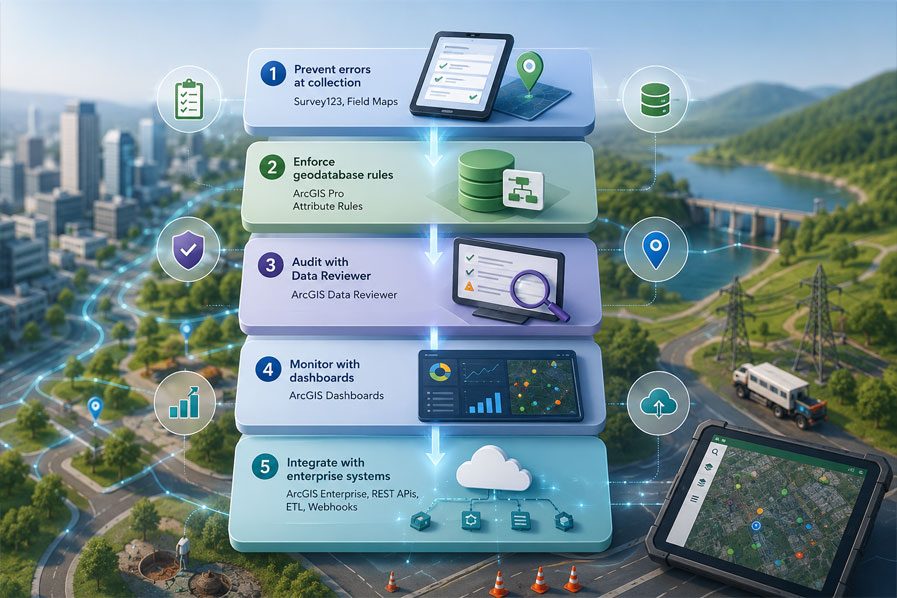
Survey123 helps prevent errors at the point of collection through required fields, constraint expressions, conditional logic, and GPS accuracy rules. For example, the USGS has used Survey123 to improve digital field data collection for rangeland and aquatic monitoring workflows, helping teams reduce error rates and improve efficiency through electronic data capture. You can reference this use case through the USGS Survey123 field data collection project.
ArcGIS Field Maps supports accurate mobile editing, location-based data collection, contingent values, and field-friendly workflows.
ArcGIS Pro attribute rules enforce business logic at the geodatabase level, regardless of whether edits come from mobile apps, office teams, imports, or integrations.
ArcGIS Data Reviewer provides systematic QA checks for spatial accuracy, topology, attribute consistency, and cross-layer validation. Esri positions ArcGIS Data Reviewer as a dedicated tool for automating, simplifying, and improving data quality management.
ArcGIS Dashboards make QA visible by showing error counts, pending reviews, submission trends, and resolution progress in real time.
ArcGIS field workflow automation is not only about improving data quality. It can also create measurable operational impact across field operations, maintenance workflows, and data governance.
$275K saved over three years
The City of Arvada Water Operations Department replaced paper map books with ArcGIS mobile workflows, reducing manual effort and saving 28 staff-hours per week on one shutoff workflow alone.
Full dataset cleanup in three months
South Adams County Water and Sanitation District used ArcGIS Data Reviewer to move from ad hoc cleanup to a repeatable QA process with better error visibility.
100% improvement in paper-based workflows
Parker Water & Sanitation District digitized field processes with ArcGIS apps and dashboards, saving 150+ maintenance hours per year and eliminating duplicate work.
50% efficiency increase
GEO SEARCH improved underground infrastructure workflows with ArcGIS, reducing tasks from one hour to five minutes per site.
$2M first-year savings
In an Esri field operations example, Gulfport Energy used ArcGIS field data collection apps to improve data accuracy, reduce paper-based work, and achieve significant first-year cost savings.
Together, these examples show that better GIS workflows can reduce rework, save field time, improve visibility, and strengthen confidence in operational data.
ArcGIS QA Automation Framework
Organizations do not need to automate everything at once. The strongest approach is to build in layers, starting with the workflows that carry the highest operational risk.
Conclusion: Better Field Data Starts with Better QA Systems
ArcGIS field workflows support critical decisions across utilities, transportation, government, public works, and infrastructure operations. When field data is unreliable, crews can be misdirected, reports become harder to trust, and maintenance decisions can be delayed.
QA automation helps reduce that risk by embedding validation into data collection, geodatabase rules, automated review, and dashboard monitoring.
At Epikso, we see QA automation as a foundation for stronger field operations and greater confidence in enterprise GIS data.
Ready to see what FieldOps.AI could do for your utility’s reporting?
Get in touch with Epikso at info@epikso.com or visit www.epikso.com to schedule a discovery workshop.
Let’s ConnectFAQs
1. What is QA automation in ArcGIS field workflows?
QA automation in ArcGIS field workflows is the use of automated validation rules, data checks, dashboards, and review processes to improve the quality of field data collected through tools like Survey123, ArcGIS Field Maps, and ArcGIS Data Reviewer.
2. Why is QA automation important for GIS field data?
QA automation is important because field data errors can lead to incorrect work orders, duplicated inspections, inaccurate asset records, compliance issues, and costly rework. Automated validation helps prevent or catch these issues earlier.
3. Which ArcGIS tools support QA automation?
The main ArcGIS tools that support QA automation include Survey123, ArcGIS Field Maps, ArcGIS Pro attribute rules, ArcGIS Data Reviewer, Arcade, Python, and ArcGIS Dashboards.
4. How does Survey123 help improve data quality?
Survey123 improves data quality by allowing teams to add required fields, constraint expressions, relevant logic, and GPS accuracy rules directly into forms. This helps prevent incomplete or incorrect submissions before they enter the GIS database.
5. When should an organization use ArcGIS Data Reviewer?
Organizations should use ArcGIS Data Reviewer when they need systematic QA checks for spatial accuracy, topology, feature integrity, attribute consistency, network connectivity, or cross-layer validation that cannot be handled by form rules alone.