



Ensuring Reliability with Esri’s Survey123 Fail-Safe Features
Introduction
In field operations, data reliability is everything. When teams work in remote, high-pressure, or low-connectivity environments, even small disruptions can compromise data accuracy.
Esri’s Survey123—a cornerstone of modern Geographic Information Systems (GIS)—addresses these challenges with robust fail-safe features that protect and preserve data integrity.
At Epikso, we help organizations integrate Esri tools like Survey123 into their workflows, ensuring seamless, secure, and reliable data collection—no matter where your teams operate.
1. Offline Data Collection
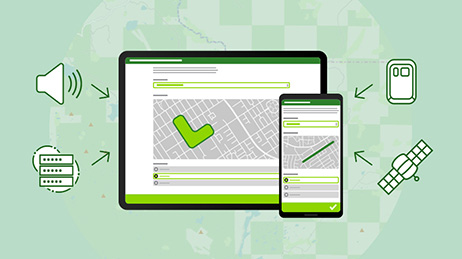
One of the most valuable features of Survey123 is its ability to collect data without internet connectivity.
How It Works: Users can download surveys and reference data before heading into the field. Even when offline, they can continue gathering information, which is later synced automatically once connectivity returns.
Example: Environmental monitoring teams and field inspectors can continue capturing data in remote areas, confident that no information will be lost.
Reference: Esri: Offline Surveys in ArcGIS Survey123
2. Data Validation Rules
Accurate data collection is critical to decision-making. Survey123 allows administrators to configure custom validation rules that prevent incorrect or incomplete data submissions.
How It Works:
- Define required fields
- Set acceptable data ranges or formats
- Apply conditional logic for dynamic validation
Example: For environmental surveys, rules can restrict temperature or pH entries to realistic ranges before the form can be submitted.
Reference: ArcGIS Survey123 – Understanding Validation Rules
3. Automatic Save and Recovery
Unexpected shutdowns or crashes can cause serious setbacks. Survey123’s auto-save and recovery function ensures that field data is preserved, even if a device fails mid-survey.
How It Works: The app periodically saves progress automatically. If a crash occurs, users can recover their work and continue where they left off.
Example: A field inspector experiencing a device failure during data entry can restart the app and resume without data loss.
Reference: Esri Blog – Survey123 Save and Recover Functionality
4. Built-In Error Reporting
Survey123 includes a real-time error reporting system that enables users to flag issues directly within the app.
How It Works: When synchronization or submission errors occur, users can report them through the interface. The reports go directly to IT teams or administrators for quick resolution.
Example: If a survey upload fails due to poor connectivity, the built-in report feature alerts the support team to resolve the problem promptly.
Reference: Esri – Built-In Error Reporting for Survey123
5. Customizable Notifications and Alerts
Timely communication keeps field operations efficient. Survey123 enables administrators to configure custom alerts that inform users about deadlines, connectivity issues, or survey changes.
How It Works: Notifications can confirm successful data uploads, warn of sync failures, or announce new form versions.
Example: Field teams receive instant alerts when offline data syncs successfully, ensuring everyone remains aligned.
Reference: Esri – Customizing Alerts and Notifications in Survey123
6. Robust Security Measures
Data collected in the field often includes sensitive information. Survey123’s multi-layered security ensures that every data point remains protected.
How It Works:
- End-to-end data encryption
- Secure authentication and role-based access
- Controlled permissions to prevent tampering
Example: Environmental impact assessments involving protected areas can safely capture and transmit data with full encryption.
Reference: Esri White Paper – Security Best Practices in Survey123
7. Comprehensive Support and Documentation
Esri supports Survey123 users with extensive documentation, tutorials, and community forums—ensuring organizations get the most from the tool.
How It Works: Users can access official setup guides, troubleshooting tips, and participate in discussions with the global Survey123 community.
Example: Field managers configuring validation rules can find detailed examples in Esri’s official documentation.
Reference: Esri Support – Survey123 Community and Documentation
Conclusion
Esri’s Survey123 is more than just a form-filling tool—it’s a reliable, secure, and resilient GIS platform designed for demanding field environments.
From offline collection and data validation to auto-save, error reporting, and secure synchronization, its fail-safe architecture ensures data remains complete and trustworthy.
At Epikso, we help organizations deploy and scale Esri’s GIS solutions to strengthen field operations, streamline workflows, and maintain data integrity across every project.
Empower your teams with reliable, cloud-connected GIS solutions today.
References
- Esri – Offline Surveys: ArcGIS Survey123
- ArcGIS Survey123 – Understanding Validation Rules for Surveys
- Esri Blog – Survey123 Save and Recover Functionality
- Esri – Built-In Error Reporting for Survey123
- ArcGIS Survey123 – Customizing Alerts and Notifications
- Esri – Security Best Practices in ArcGIS Survey123
- Esri Support – Survey123 Documentation and Community Forum

The Power of Large Language Models: A Quick Guide

The Future of Public Transit: How AI Is Driving Smarter, Safer, and More Sustainable Mobility

Nearshoring in Mexico 2025: The Smart Move for IT and Digital Transformation
About Author

David Miller
Digital marketing consultant with 15+ years' experience. Primarily focused on consulting companies on their digital presence while helping them grow technology for attribution and advertising. Worked with brands and created product roadmaps, created and managed multivariate testing, performed site optimization to increase organic traffic, improved conversion rate on e-commerce sites, and created monetization plans for the largest business websites in the US.